
Home » Download

BETJL App Download: Official Mobile App for Fast Play in BD
Start fast with the official BETJL mobile app built for quick play in BD
Get BETJL app download to play faster on mobile. Enjoy live cricket markets, JILI slots, and quick login designed for 4G and Wi‑Fi in BD. The app is light, updates quickly, and keeps you closer to the action with smarter notifications and clearer menus.
Your account security stays front and center. Verification is simple, and your profile name can match your payment name for smoother banking later. Need to switch to desktop for support or account checks? Go straight to the BETJL Main Site from your browser.
Why the BETJL mobile app fits BD playing habits and daily data limits
The app is built for short sessions, quick odds checks, and fast bets during busy match windows. It keeps data use tight while giving you instant access to cricket and slots.
Fast starts and lower data during peak hours
Pages open quickly and cache key assets to reduce repeat downloads. That helps on tight data packs and crowded evening networks.
One‑tap login with stronger security options
Use a PIN, fingerprint, or Face ID for faster BETJL login. Extra checks help protect your balance and personal details without slowing you down.
Live cricket odds that refresh with match momentum
Track scores and markets on the same screen. Place quick bets on top tournaments and local fixtures without switching tabs.
Slots and JILI favorites with smooth, reliable gameplay
Spin popular JILI titles with stable performance and quick load times. Try new releases alongside your daily picks.
Notifications that actually help, not distract
Get alerts for kickoff, key price moves, and time‑limited offers. You choose which updates to receive, and you can mute them anytime.
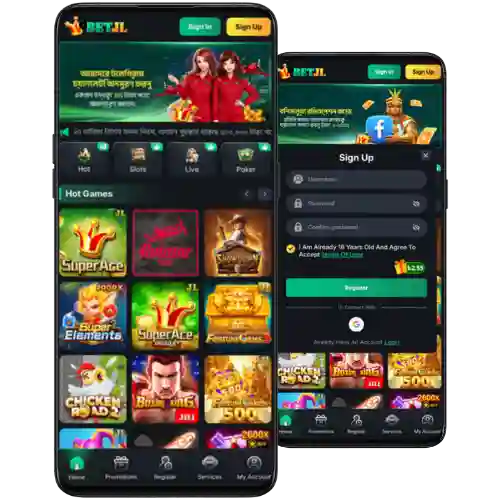
Step-by-step guide to download, install, and update the BETJL mobile app
- Open your mobile browser and visit the BETJL official site. Log in or create your account to access the app page.
- Android: Tap “Download App” on the site. When asked, allow your browser to install apps from this source. Confirm the file download.
- Android: When the file finishes, open it from the notification or your downloads folder. Tap Install, then wait a few seconds.
- iOS: Follow the on‑site prompt. If an App Store link appears, use it. If not, tap “Add to Home Screen” in Safari to create the web app icon.
- Open the app, sign in, and enable notifications if you want score and promo alerts. Keep your profile details accurate for faster support.
- To update later, tap Check for Updates inside the app menu. If needed, reinstall from the official site to get the newest build.
For Android users, the official installer is the BETJL APK shared only on the app page inside your account.
Key mobile features designed for quick bets and clean, simple menus
- Fast load times that cut waiting during live cricket and busy evenings.
- Clean menus and a quick bet slip to confirm picks in fewer taps.
- Smart notifications for price moves, match starts, and bonus alerts you choose.
- Biometric login options for speed and added account protection.
- Live match views that pair odds with scores for fast decisions.
- Top slots, including JILI, with stable performance and short load times.
- Data‑friendly setup that helps on limited packs and spotty networks.
- In‑app help center with chat handoff for quicker answers when you need them.
- Account tools to review bets, limits, and recent activity in one place.

Exclusive app promos, reload rewards, and alerts during peak cricket fixtures
Open the app to catch timed promos during major cricket weeks. You may see reload boosts, login streak rewards, and targeted price boosts on your favorite markets, including BETJL cricket options.
New to the app? Watch for the BETJL welcome offer and confirm your account details early to avoid missing time‑limited rewards. Turn on notifications so you get promo alerts before matches start.
Check the promos tab often for ongoing BETJL bonus updates. Offers can change by event or time, so act within the stated window shown in the app.
BETJL App Download and Installation FAQs for Mobile Users in BD
Is the BETJL app free on Android and iOS?
Yes. The Android installer is provided from the official app page. On iOS, you can use the Home Screen web app or an App Store link if the site displays one in your region.
Why won’t the Android installer open on my phone?
You may need to allow your browser to install apps from this source in Android settings. Also check storage space, your connection, and re‑download if the file was interrupted.
How do I update to the latest app version?
Open the app menu and tap Check for Updates. If a new build is available, follow the prompt. You can also reinstall from the official site to refresh everything.
Can I bet on live cricket and play JILI slots in the app?
Yes. Live cricket markets refresh quickly with score context, and JILI slots run with stable, fast loads for smooth spinning on mobile.
Is the app safe to use on my device?
Yes, if you install from the official app page and review permissions. Biometric login, OTPs, and encrypted connections help protect your account and data.
Ready to play faster? Get the app and lock in your edge
Install the app, sign in, and set your alerts before the next match window. New players can tap the signup button and complete BETJL Register to get started in minutes.
Move now with a quick BETJL app download to track cricket prices, spin JILI slots, and manage bets on the go. Keep the app updated and stay close to the action every day.